
Find Near Me globe location pin logoFind Near MeDiscover Everything Around You
PLACES · SERVICES · MAPS · DIRECTIONS · EVERYWHERE

Find Everything Near You

Places, Services, People, Business and More

Your location is used only when you search.

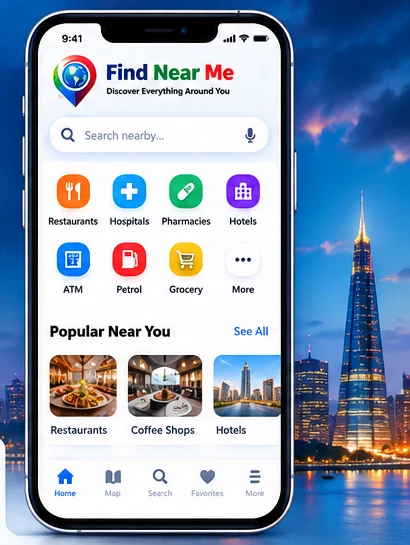
Find Near Me Android app preview showcasing search, categories and navigation
🌍 Explore from anywhere

Explore nearby

Made for your phone, too

One design for desktop and Android. The phone below is a visual preview; live searches use the main search above.

📍 Nearby discovery

Explore services around you using device location.

🎙 Voice search

Speak a search on supported browsers.

🗺 Maps & directions

Open routes in your map application.

🌐 Nine languages

Choose the interface language that suits you.

Nearby results
↗ More results on Google Maps If Chrome blocks GPS, choose a location on the map.

📍 Ready to explore?

Choose a category above or search for a place. Allow location access when prompted to find nearby results.

Places are returned by the free Geoapify API using community-maintained OpenStreetMap data. Coverage varies; use the optional Google Maps link for another search.

🗺️ Results on the mapTap a pin to inspect a place

🎙 Voice search

Speech recognition on supported browsers. Availability varies by device and language.

🧭 Directions

Open walking or driving directions in a map application.

🔒 Privacy

Your selected coordinates are sent to our Cloudflare search endpoint and Geoapify to find places; favorites stay on this device.

Everything nearby, in one place

Find everyday services, see community-maintained place information, compare straight-line distances, save favorites on your device, and open directions in a map app. Data availability varies by area.

📍 Nearby places

Hospitals, pharmacies, restaurants, hotels, transport, banks and more, with automatic expansion up to 20 km.

🎙 Voice or typed search

Use supported browser speech recognition or type in the search box; you stay in control of location permission.

🗺 Map and directions

Preview results on the map when tiles load, and open navigation in Google Maps or OpenStreetMap.

🌐 Nine interface languages

English, বাংলা, 日本語, 中文, Русский, Français, Deutsch, Español and العربية.

♡ Device favorites

Keep useful saved places and searches on this browser. Sign-up is not required.

⚡ Lightweight and accessible

Responsive layout, light/dark options, reduced-motion support and clear fallbacks for unsupported features.

How to use Find Near Me

1. Choose

Select a category or type a place such as “hospital” into the search field.

2. Allow location

When the browser asks, grant location permission for accurate nearby results. HTTPS or localhost is recommended.

3. Explore

Review available place cards and map markers; use filters, favorites, and listed hours when present.

4. Navigate

Tap Directions to open your preferred maps app. Route timing is provided by the external maps service, not this site.

Try a nearby search ↑

🎙 Voice search: what can I say?

Tap the microphone next to the search box, allow microphone access if prompted, say a place or category clearly, and wait for the recognized words. A search starts automatically after successful recognition. The examples below also fill the search box if you prefer typing.

For reliable results, speak a simple place/category term. Complex requests like “open pharmacy within 3 km” are not fully parsed as filters yet: select the radius separately and check business hours yourself.

Checking voice recognition availability…

Before voice searching

Use a supported up-to-date browser and a working microphone. Allow microphone permission and internet access; recognition may use an online service depending on browser and language.

Languages and limitations

Choose your interface language first. Recognition language is requested accordingly, but speech support is not guaranteed for all available languages on all browsers.

If voice does not work

Check browser microphone permissions and OS input device, retry, or enter your search manually. Voice is optional.

What works offline?

Limited offline mode is supported after an initial successful online visit. You can reopen cached pages, read this guide, and use previously stored favorites where available; fresh nearby results, GPS-based place lookups, online map tiles, turn-by-turn routes and browser speech services generally need a connection. Offline content is not a full offline map.

For reliable installation, open the hosted HTTPS website and use your browser's “Install app” or “Add to Home screen” option if available. Offline caches can be cleared by the browser, and a local file (`file:///`) is not a supported offline-installation test.

Checking connection…

MEET THE CREATOR

ABOUT ME

Professional portrait of Jahangir Alam Talukder

Product owner and developer of Find Near Me.

Jahangir Alam Talukder

Principal SDET · Senior QA Automation Engineer · Software Developer

I am a Bangladesh-based software development, software quality and automation specialist with more than 16 years of IT experience across QA automation, API and performance testing, and engineering leadership. My work includes AI-forward SDET practices, functional and UI test automation, API and performance engineering, and building reliable automation solutions with modern software technologies. I hold ISTQB certifications.

I create practical digital experiences from Bangladesh, including Find Near Me, Amar Sathi (elderly assistance) and Purbachal Racing (a Bangladesh-inspired browser racing game).

Frequently asked questions

Is Find Near Me free?

Yes, the website is free to use. Internet/data charges from your mobile or internet provider may apply.

Does it work worldwide?

The search supports locations globally where Geoapify has place records, subject to availability, accuracy, and the free API quota. Coverage and accuracy vary by location.

Do I need to sign in?

No account is required for basic search. Device favorites can be stored locally in your browser.

Does the website save my GPS location?

The current site requests device location for a search and does not create a server-side account or location history. External search, tile and directions providers may receive location-related data.

Why is the map blank or a search unavailable?

The free place-data provider can reach its quota, become unavailable, or have incomplete coverage. Check the connection, retry, or open the location in an external maps service.

Are voice commands completely offline?

No. Many browsers use network-based speech recognition and support varies by language and device. Always provide typed search as a fallback.

Can I see opening hours and route times?

Opening hours appear only when listed by the map data provider. Distances shown in our results are straight-line estimates; follow the external map app for actual route details and times.

Contact the developer

Jahangir Alam Talukder

Principal SDET · Product owner & developer · Bangladesh

Connect with me for feedback, accessibility suggestions, and product collaborations. Explore my other projects: Amar Sathi ↗ and Purbachal Racing ↗.